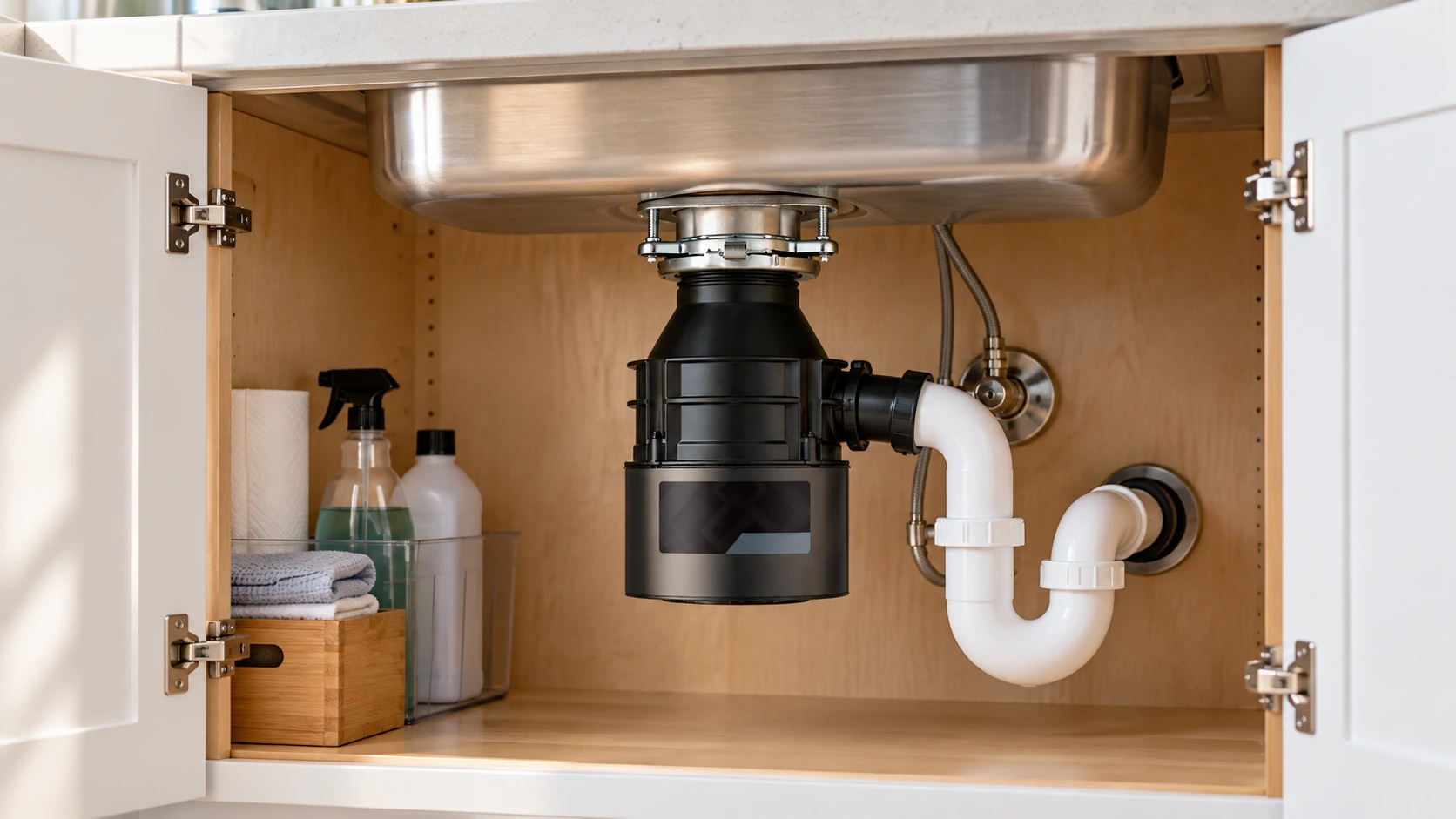
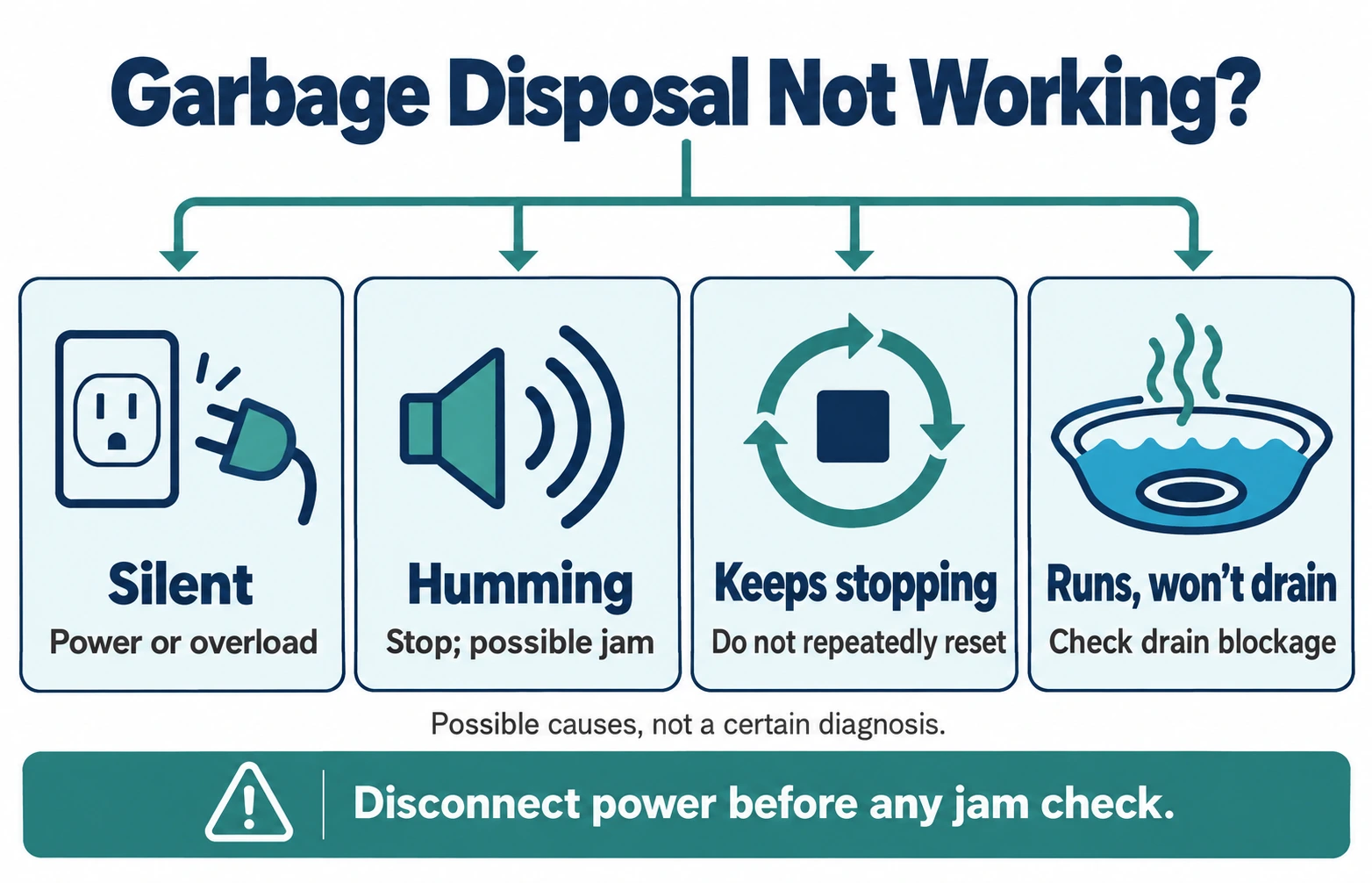
If your garbage disposal is not working, start with what happens when you try to use it. A completely silent unit may have lost power or tripped its overload protection. A humming disposal may be jammed. If the motor runs but the sink will not drain, the problem could be in the drain piping rather than the motor.
These problems call for different next steps. Use the symptom guide below to narrow things down without opening electrical wiring or putting your hand inside the grinding chamber. Reset-button locations and unjamming tools differ by brand and model, so check the instructions for your own disposal before taking action.
Safety first: know when to stop
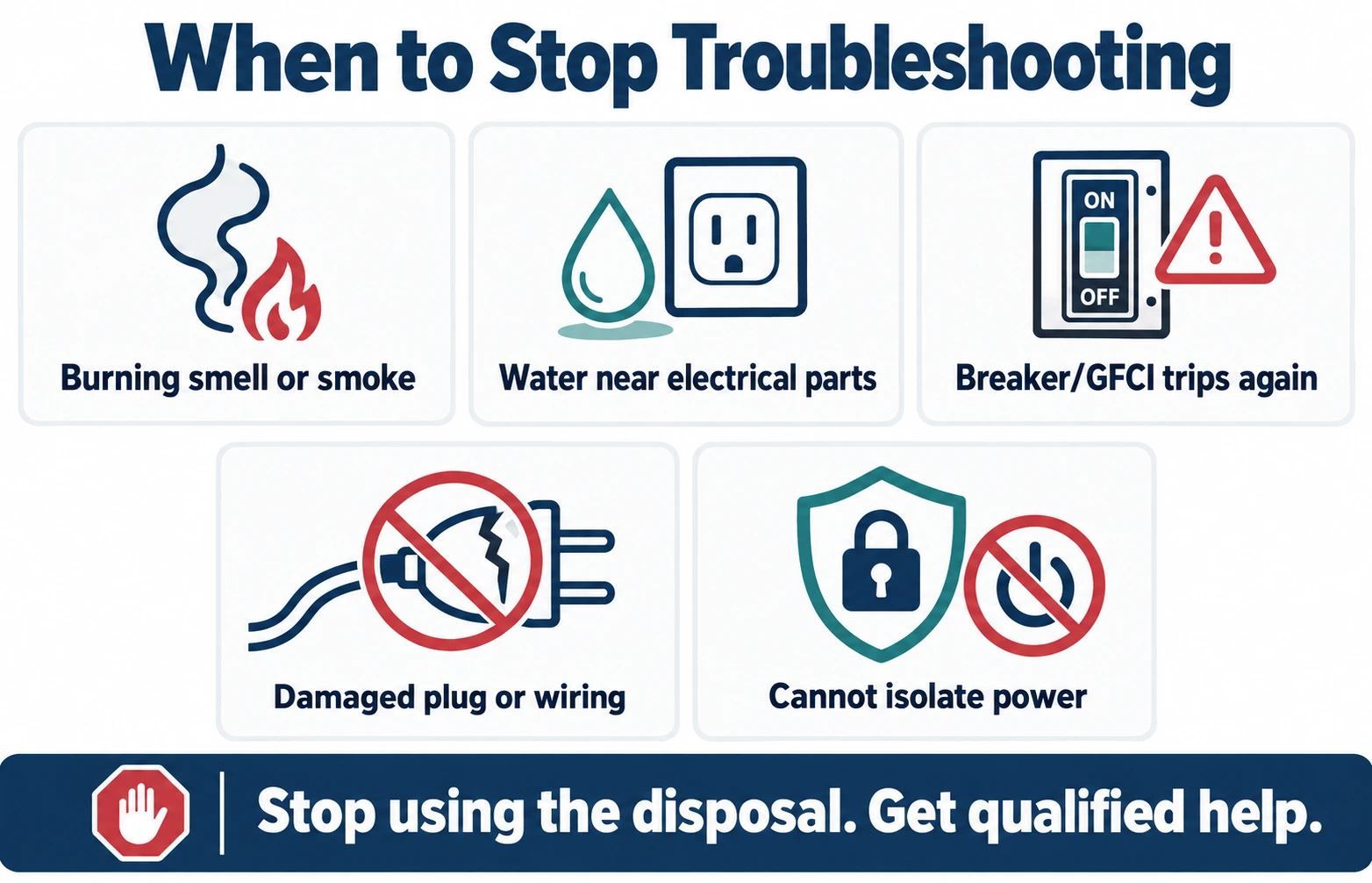
Stop using the disposal if you notice smoke, a burning smell, sparking, damaged wiring, water near electrical parts, or a breaker or GFCI that repeatedly trips. Do not touch wet electrical connections or attempt another reset. Switch off power only if you can do so safely, and contact an appropriately qualified professional.
Never reach into a garbage disposal with your hand—even when the wall switch is off. Before any jam-clearing work, disconnect the plug or switch off the appropriate breaker, and use only the method and tools specified for your model.
First, match the symptom to the next check
The sound—or lack of sound—is a useful starting point, but it is not a certain diagnosis. For example, a jammed disposal may hum at first and then go silent after an internal overload device trips.
| What you notice | What it could mean | Where to go next |
|---|---|---|
| No sound at all | Power interruption, an activation-switch issue, or tripped motor overload protection | Check accessible power controls, then model-specific reset |
| Humming or buzzing, but no grinding | Possible jam or a motor that cannot turn its grinding mechanism | Stop the motor and check the model's unjamming procedure |
| It hummed, then went silent | A jam may have triggered overload protection; a power fault is also possible | Check for a jam safely before trying the approved reset |
| Starts, then stops repeatedly | Possible overheating, intermittent overload, obstruction, or electrical fault | Do not keep resetting |
| Motor runs, sink drains slowly | Possible blockage in the disposal outlet, trap, or downstream pipe | Investigate drainage separately |
| Leaking, smoking, or smells hot | Possible plumbing or electrical hazard | Stop-use checks |
Garbage disposal completely silent? Check the power path
If the disposal makes no noise when you use the switch, begin with simple observations in a dry, safe area. You do not need to remove the appliance cover, open a junction box, or measure electrical voltage.
1 Identify the controls
Some disposals use a wall switch; others use an air button or a batch-feed stopper. Check that the correct control is engaged. On batch-feed models, the stopper may need to sit in its operating position. Do not take a switch apart.
2 Check an accessible plug
With the activation switch off, look for a loose or unplugged power cord under the sink only if the area is dry and safe. Some units are hardwired and do not have a removable plug. Never handle wet or damaged cords.
3 Look for a tripped GFCI or breaker
A GFCI-protected receptacle or circuit breaker may have interrupted the supply. If the device is accessible and dry, and there are no hazard signs, follow its normal labeled reset procedure once. If it trips again, stop and call an electrician.
4 Distinguish outlet and disposal faults
For a plug-connected unit, InSinkErator recommends unplugging the disposal and testing the switched receptacle with another small appliance. Only do this if the outlet and your hands are dry and undamaged. If unsure, have an electrician test it.
If the outlet works but the disposal remains silent, that does not prove its motor has failed. The internal overload protection or a jam may still need to be addressed according to the manufacturer's instructions. For a hardwired unit, leave electrical diagnosis to a qualified electrician or authorized service technician. See InSinkErator's power-check guidance and Moen's control-type troubleshooting.
How to reset a garbage disposal—without guessing
Many garbage disposals include an overload protector that shuts the motor down when it overheats or stalls. However, the reset procedure is not universal. A house GFCI RESET button and the disposer motor's overload reset are different safety devices.
| Example product family | Overload/reset behavior | Official instructions |
|---|---|---|
| Many conventional InSinkErator models | Manual red square overload button underneath; if it will not remain in, the manufacturer says to wait about 10 minutes before retrying. | InSinkErator reset instructions |
| InSinkErator EZ Connect | Automatic overload recovery after cooling—up to about 20 minutes per manufacturer guidance; the wall-switch and air-switch procedures differ. | EZ Connect exception |
| Waste King models covered by its FAQ | Manufacturer describes a lower-body reset button; inspect your model manual for its location and procedure. | Waste King FAQ |
| Moen disposals covered by its service guide | Manufacturer identifies a red motor reset button; location and access depend on the model. | Moen power guidance |
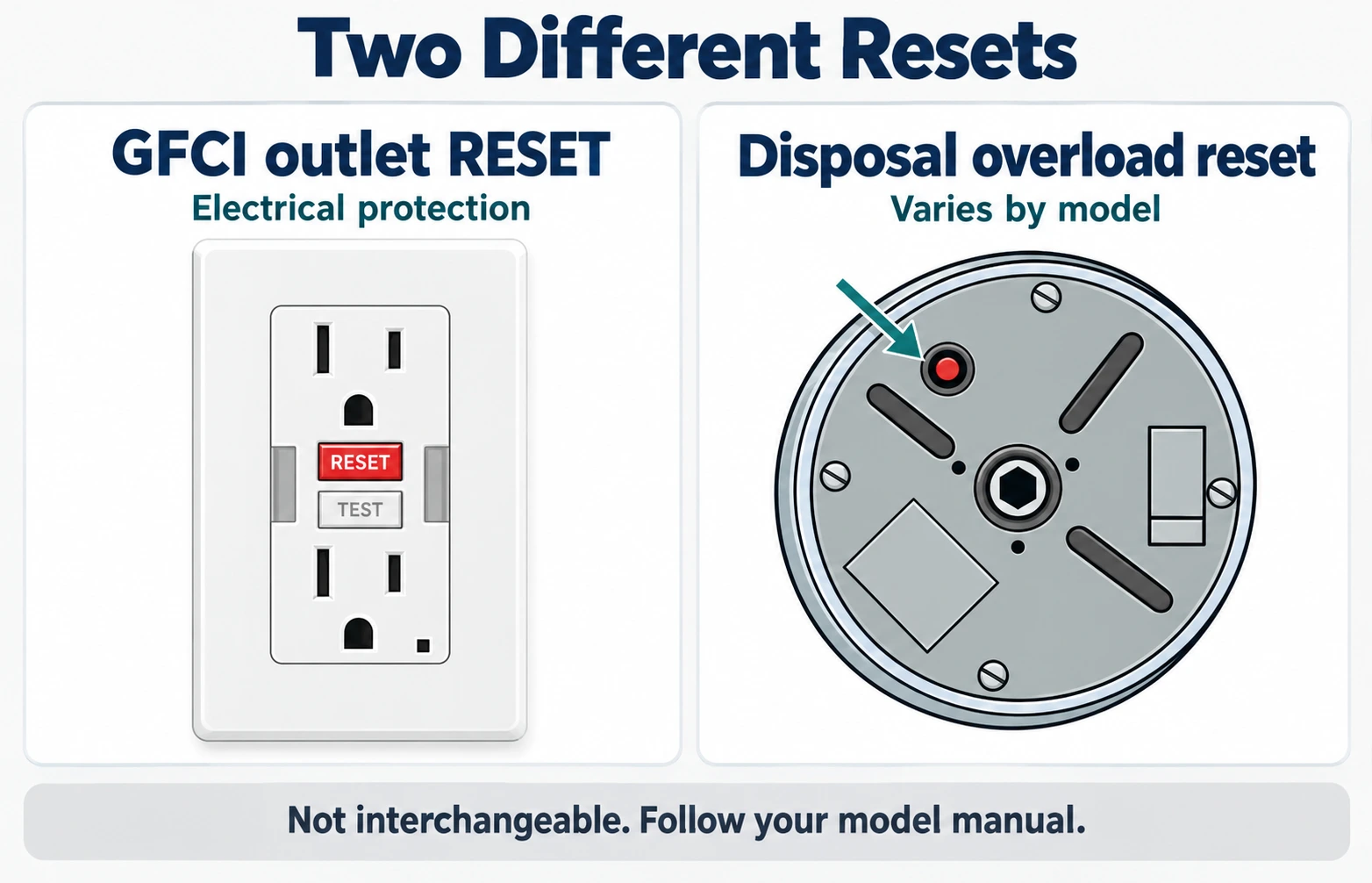
If you cannot find a reset button, do not assume it is missing or broken. First identify the brand, model and type of overload protection. An automatic-reset model may not have the same user-operated button shown in older tutorials.
Garbage disposal hums but will not spin
A low hum without grinding movement can mean the motor is trying to turn a jammed grinding mechanism. Turn it off immediately; letting it hum continuously can cause overheating and trip the motor's overload protection. If the disposal later becomes silent, that sequence may explain why—but confirm rather than assume.
Before touching any part of the mechanism, unplug the disposal or turn off the proper breaker. Remove visible foreign objects only with long-handled tongs or pliers, and follow the exact unjamming procedure supplied by your manufacturer. Do not put fingers into the chamber, use a powered test while a tool is inserted, or treat every disposal as having the same underside Allen-wrench access.
The tool depends on the model
- Many InSinkErator models: the manufacturer specifies its Jam Buster wrench or a compatible 1/4-inch Allen key in the intended opening at the center of the underside. Certain InSinkErator families use a different from-above procedure.
- Waste King: its FAQ describes moving the turntable using a wooden spoon handle or approved unjamming tool through the sink opening after disconnecting power.
- Moen: its guide specifies a model-appropriate unjamming wrench (Moen part #1037) from the sink opening and warns against putting a hand inside.
For an accessible, model-approved procedure, the overall sequence is: disconnect power; inspect with a flashlight; use the prescribed unjamming tool if the manufacturer allows it; remove visible debris using tongs; remove all tools; restore the correct reset/overload state; and test only after the area is clear and safe. If the turntable will not move, the problem returns immediately, or you cannot confidently identify the mechanism, stop and arrange service.
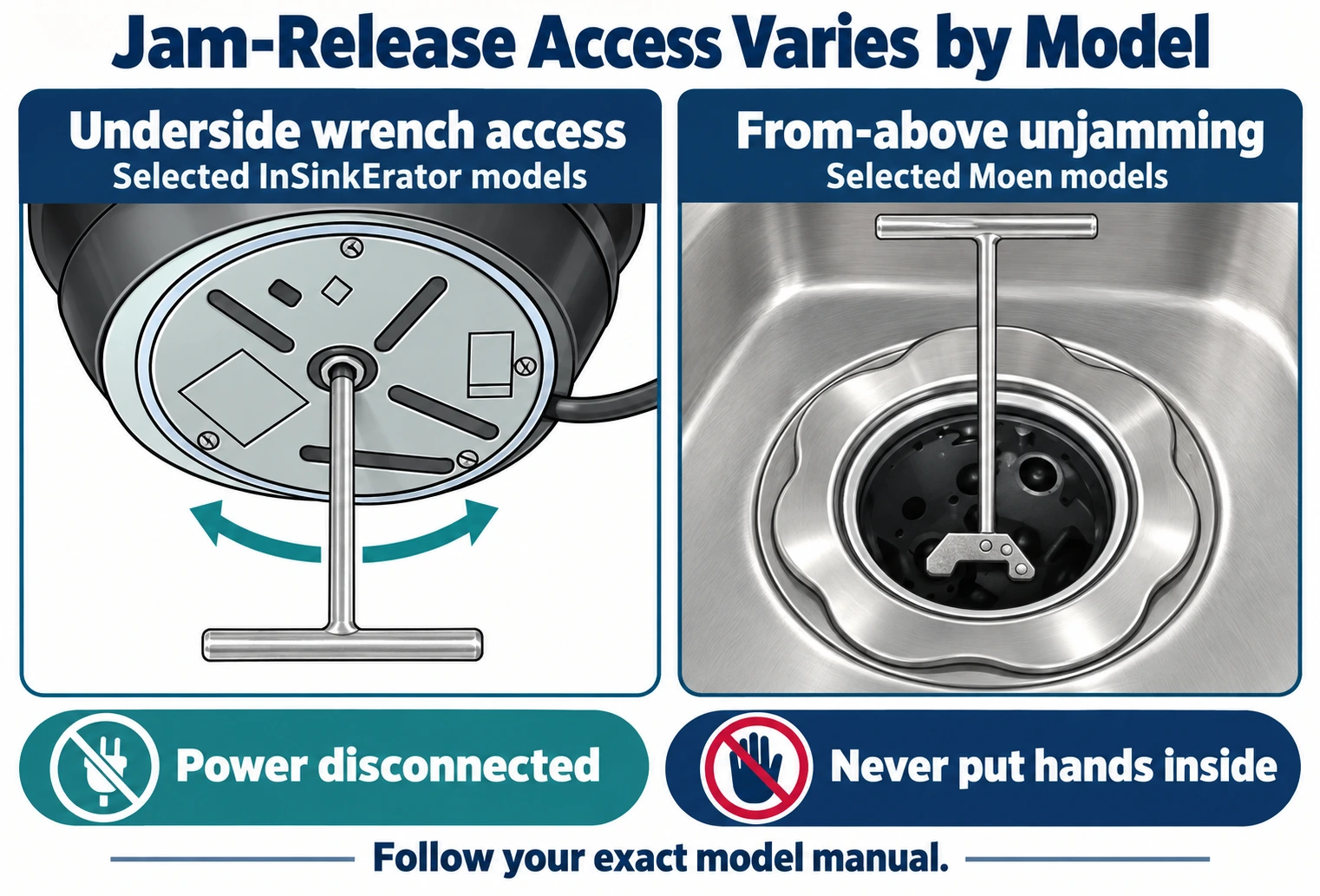
Manufacturer references: InSinkErator jam guide, Waste King FAQ, and Moen unjamming guide. This is a brief orientation; model-specific jam repair warrants its own detailed instructions.
Disposal starts, then stops—or the reset keeps tripping
Repeated shutdown can result from a jam, an overloaded motor, or an electrical problem. Because the same symptom may have different causes, repeatedly resetting the disposal or breaker is not a repair.
- Stop powered attempts. Turn the control off and allow the appliance to cool as directed by its manufacturer.
- Think about what happened just before shutdown. Did it hum, struggle, or stop while grinding a hard object? If so, inspect for a jam only after disconnecting power.
- Use the correct reset only after checking the cause. A manual overload button, automatic protection and a tripped house GFCI are not interchangeable.
- Escalate repeat trips. A breaker, GFCI or overload protector that trips again deserves professional assessment; do not bypass the safety device.
If the unit shuts off when an air button is pressed or a batch-feed stopper is positioned, identify that activation method before troubleshooting. Moen documents wall, air, batch-feed and fiber-optic controls, each with different failure points. Electrical repairs inside an air-switch controller, outlet, wall switch or hardwired connection should be left to a qualified professional.
Garbage disposal runs, but the kitchen sink will not drain
A spinning, normally sounding disposal and a slow-draining sink can be two separate issues. Water may be obstructed in the discharge connection, P-trap or drain line. A slow drain does not automatically mean the disposal motor is broken.
Safe first checks
- Stop using the disposal and switch off/disconnect its power before inspecting the sink opening.
- If there is standing water, avoid reaching through it toward electrical equipment. Do not run the motor repeatedly in an attempt to force a blockage through.
- If no chemical drain cleaner has been used, a model-appropriate sink plunger may help dislodge a drain clog. InSinkErator's drain guidance describes sealing the other bowl opening for a double sink.
- Contact a plumber when plunging fails, the blockage appears downstream, or multiple fixtures back up.
Avoid chemical drain openers
Moen expressly warns against lye and chemical drain cleaners in its disposals. Do not add more chemicals to a backed-up sink.
If a chemical product is already present, do not plunge or disassemble the drain; tell the plumber what was used.
InSinkErator's clogged-disposal guide distinguishes a downstream blockage from a disposal that will not turn. If a dishwasher stopped draining immediately after a new disposal was installed, the dishwasher inlet setup may also need checking by following the installation manual—but that is an installation-specific problem, not proof of a bad motor.
What if the disposal leaks, smells hot, or makes an unusual noise?
Water plus electricity changes the priority. Stop using the unit if water is reaching a cord, receptacle, controller or exposed connection. Do not touch or test a wet electrical setup. Smoke, sparks, crackling or a strong burning odor also require immediate stop-use and professional help.
For a leak in an otherwise safe, de-energized area, note whether the water first appears around the sink mounting flange, a dishwasher hose, a drain elbow or the disposal body. Water can travel down the outside of the unit and appear to emerge from its bottom. Both InSinkErator and Moen advise identifying the actual leak location instead of assuming every bottom drip means internal motor seals have failed.
When to call an electrician, plumber, or disposal service
Choose the professional based on the fault—not simply because the disposal will not run.
Electrician
For a dead or damaged outlet, faulty wall switch, wet electrical equipment, repeated GFCI/breaker trips, or hardwired supply problems.
Plumber
For blocked sink piping, persistent backups, disposal discharge leaks or plumbing connections that need repair.
Manufacturer / appliance service
For an immovable mechanism, recurring internal overload trips, suspected motor failure or a unit that remains inoperative after safe checks.
Should you repair or replace it?
A loose plug, one-time overload trip or removable obstruction does not automatically justify buying a new disposal. Conversely, a failed sealed assembly or a motor problem confirmed by service may make replacement more appropriate. Check the model label, installation condition, applicable warranty and any manufacturer's service options before deciding. There is no trustworthy universal replacement age or repair-cost threshold for every unit.
Frequently asked questions
Why did my garbage disposal suddenly stop working?
It may have lost electrical power, tripped its motor overload protector or jammed during use. Start by noting whether it is silent, humming, or running without draining. Avoid repeated reset attempts until the underlying issue has been considered.
What if my garbage disposal has power but will not run?
A functioning receptacle does not rule out a tripped internal overload protector, a jam, an activation problem or a failed appliance component. Identify the model and follow the correct reset and jam guidance rather than assuming the motor is bad.
Why is my disposal humming but not grinding?
A jam is a common possibility. Turn the unit off immediately, disconnect its power, and consult the manufacturer's unjamming instructions. Some models use an underside wrench while others require a tool from the sink opening. Never put your hand in the chamber.
Why won't my garbage disposal work after I press reset?
The cause of the shutdown may still be present, the motor may need the manufacturer's cooling period, or the power or activation system may have another fault. Do not keep pressing reset if the device immediately trips again; arrange service.
What if there is no reset button on my disposal?
Some product families—including InSinkErator EZ Connect—have automatic overload recovery instead of the same manual button found on older models. Find the model number and follow its documentation rather than trying to locate a nonexistent control.
My sink garbage disposal is not working and water drains slowly. Are they related?
They can be, but not always. A blocked drain may coexist with a jammed or electrically unpowered disposal. If the motor runs normally and the sink backs up, investigate the drain path rather than assuming the motor failed. A plumber may be needed for deeper blockages.
Can I use drain cleaner or put my hand inside to clear a jam?
Do neither. Moen warns that lye and chemical drain cleaners can damage garbage disposals. Manufacturer safety instructions also say never to put a hand into the chamber. Disconnect power before any permitted work and use model-approved tools and long-handled tongs instead.
Manufacturer and safety references
This guide is based on published manufacturer instructions and electrical-safety guidance, not on claimed hands-on testing of every model. Always defer to your disposal's own installation and service manual.
- InSinkErator — Disposal won't turn on or off
- InSinkErator — Resetting a disposal (including EZ Connect)
- InSinkErator — Fixing a jammed disposal
- Waste King — Official disposal troubleshooting FAQ
- Moen — Garbage disposal has no power
- Moen — How to unjam a garbage disposal
- InSinkErator — Clogged disposal and sink drainage
- Moen — Chemical drain cleaner warning
- Electrical Safety Foundation International — How to use GFCIs
For related homeowner information, see the Garbage Disposal section of Home System HQ.